A visual hex explorer
Veles Binary Analysis: The Open Source Tool, Its Install Path and a Workflow
Veles paired a hex view with digram, layered digram and trigram views of raw bytes. The project is read-only since 2020, but its method still works and its ideas live on in newer tools.
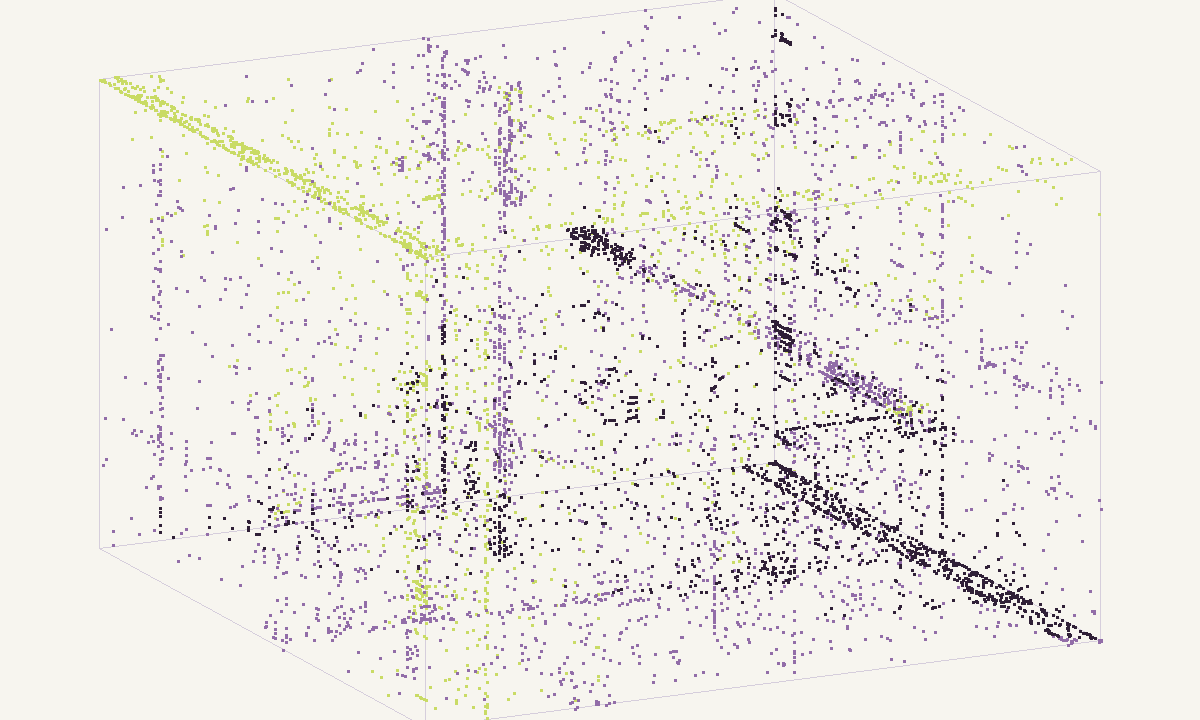
Veles is an open source binary analysis tool that combines a hex explorer with statistical pictures of raw bytes. It opens any file, draws digram, layered digram and trigram views of it, and lets you carve the region that looks interesting. Veles binary analysis is therefore a triage step that happens before any parser or disassembler gets involved. This guide covers what the program actually does according to its repository and release notes, how to install the last build, how a real session on an unknown file goes, where it falls short, and which maintained tools cover the same ground today.
Veles binary analysis as an open source tool
The project is written in C++ with Qt 5 for the interface and Python 3 for the server and scripting layer, and it is licensed under Apache 2.0. Its repository collected roughly 1,240 stars before it was set to read-only on 30 September 2020. Six releases were tagged between January 2017 and May 2018, each with a code name: 2017.1.0 MechanicalTurk, 2017.2.0 YAGNI, 2017.5.0 Switezianka, 2017.06.0 SWOND plus a bugfix, and 2018.05.0 TIF.
The core of Veles binary analysis is three views. The digram view treats every pair of adjacent bytes as an x,y coordinate on a 256 by 256 plane and makes frequent pairs brighter. The layered digram cuts the file into 256 equal slices and stacks one digram per slice into a cube, so you can see how content changes from start to end. The trigram view does the same with byte triples in a 256-cubed space. Points are tinted by where in the file they occur, and the cube can be redrawn as a cylinder or a sphere. A minimap strip on the left shows the whole file, either as average byte value or as Shannon entropy, and two sliders choose the range that the main view draws.
Around the views sits a conventional hex view with search and replace, “Copy as” encoders and, from the 2018.05 release, commands to select a chunk and save it to a file. A tree view lists parsed structures. The January 2017 release added parsers for avi, bmp, elf, gif, pe, mov and zip, generated from Kaitai Struct templates, and a network protocol so external Python scripts could act as ad-hoc parsers. The February 2017 release added an initial disassembler for Python 3 bytecode. From May 2017 the program ran as a client and a server: the server, written in Python 3, could run on another machine and serve several users, and scripts in Python 2 or 3 could talk to it, though without GUI operations.
Install and the last release
Release 2018.05.0 is the one to use. It ships Veles_2018.05_64bit_Windows.exe, Veles_2018.05_64bit_Ubuntu1604.deb and Veles_2018.05_64bit_OSX.dmg. Its notes list experimental hex editing, faster hex rendering, an adjustable number of hex columns, orthogonal projection in the trigram view, configurable trigram colors and a batch of macOS fixes for TLS certificate checks, high-DPI screens and the deployment target.
For linux binary analysis on Ubuntu 16.04 the .deb installs directly, with the universe repository enabled. Newer distributions are harder. The build instructions require CMake 3.1 or newer, zlib, Qt 5.5 or newer, Python 3.5+, python3-msgpack, pyOpenSSL and OpenSSL at least 1.0.0 but below 1.1.0. That last constraint is the real obstacle: current distributions ship OpenSSL 3, so a source build means compiling an old OpenSSL into a private prefix or patching the code. A container based on an Ubuntu 16.04 image with X11 forwarding is the least painful route. The build itself is the usual mkdir build && cd build && cmake -D CMAKE_BUILD_TYPE=RelWithDebInfo .. && make, followed by a Python virtual environment with the packages from python/requirements.txt.
A workflow on an unknown file
Say a firmware update arrives as a single 6 MB blob with no recognizable header. Start in the minimap with the entropy mode. Bright, flat bands are compressed or encrypted; darker, textured bands are code, tables or text. Drag the sliders over one textured band and switch the main view to trigram.
If the band is x86-64 code, two bars appear along the cube faces. They come from REX prefixes: 64-bit operations prefix the opcode with a byte from 0x40 to 0x4F, most often 0x48, followed by a MOV opcode such as 0x89 or 0x8B. That pair is so common that it forms a line of trigrams ending in it and another starting with it. ARM32 code looks different again, with a cluster driven by the condition nibble 0xE in the top byte of each little-endian instruction word. Text shows up as a dense block in the 0x20 to 0x7E range.
Next, move to a high-entropy band and rotate the trigram cube slowly. Encrypted data with a decent cipher stays a uniform cloud from every angle. DEFLATE output usually shows faint planes and stripes, and the comparison guide on telling compressed data from encrypted data lists what each algorithm leaves behind. Once a band is classified, use “Select chunk” and “Save chunk to file”, then hand the piece to a format tool: file, binwalk, a decompressor or a disassembler. The whole session takes a few minutes, and its output is a short list of offsets, each paired with the tool that should process it.
Limits
Veles samples large files. With a sample size of N bytes it reads the square root of N runs, each the square root of N bytes long, so a 1 MB sample is 1,024 runs of 1,024 bytes. That keeps the frame rate usable, but small features such as a 200-byte header can drop out of the picture unless you narrow the range with the minimap. Disabling sampling on a very large file can freeze or crash the program.
The hex editor never became a full editor, the Kaitai parsers were limited to the seven formats shipped in early 2017, and user-supplied Kaitai files were announced but not delivered. The scripting API was marked as changing between releases. With no fixes since 2019, security issues in the old OpenSSL and Qt dependencies will not be patched, so do not run the server on a network you care about. Because the code is open source under Apache 2.0, a fork could fix all of this, but the original repository no longer takes patches. Veles binary analysis today is best treated as a teaching aid and an offline viewer for samples you are allowed to open.
Binary analysis tool alternatives today
Each of the projects below is maintained and covers part of what Veles did. The binary data visualization overview explains when each kind of picture helps, and the digram and trigram walkthrough covers the math behind them.
| Tool | License | What it adds | Platforms |
|---|---|---|---|
| ImHex | GPL-2.0 | Hex editor with entropy graph, byte distribution, digram and layered distribution graphs, a pattern language and YARA scanning; v1.38.1 from December 2025 | Windows, macOS, Linux |
| Cantor Dust | Apache-2.0 | Byte 1-, 2- and 3-tuple views, metric map on a space-filling curve, linear bitmap; clicks jump to bytes in Ghidra | Ghidra extension or standalone Java app |
| binwalk v3 | MIT | Signature scan, extraction and entropy graphs; rewritten in Rust, v3.1.0 from October 2024 | Linux, Docker, Cargo |
| binvis.io | n/a | Browser view of a file laid out on a Hilbert curve, colored by byte class or local entropy | Browser |
For a modern linux binary analysis desk, ImHex covers the hex view and the digram pictures in one maintained binary analysis tool, binwalk handles signatures and entropy plots on the command line, and Cantor Dust brings trigram clouds into a Ghidra session. Cantor Dust descends from Christopher Domas’s original cantor.dust work, the same line of ideas Veles credited for its views, so a reader who learned the Veles cube will recognize it at once.
Questions readers ask
Is Veles still maintained?
No. The GitHub repository was set to read-only on 30 September 2020 and the last code push dates from June 2019. The final tagged release is 2018.05.0 from May 2018. The source stays available under the Apache 2.0 license, so anyone can fork it, but bug reports and pull requests no longer get answers.
Which platforms did the last Veles release support?
Release 2018.05.0 shipped three 64-bit packages: a Windows installer, a .deb built for Ubuntu 16.04 and a macOS disk image. A 32-bit Windows build existed only up to the February 2017 release. Other Linux distributions have to build from source with CMake, Qt 5.5 or newer and Python 3.5 or newer.
Can Veles edit files?
Partly. Byte editing in the hex view arrived in the June 2017 release without the ability to change file size, and the 2018.05 notes still call editing experimental because of backend problems. Treat Veles as a viewer and carving aid, and patch files in a dedicated hex editor such as ImHex.
What replaced Veles for trigram views?
Cantor Dust is the closest match: it draws byte pairs on a 256 by 256 grid and byte triples in a 256-cubed cloud, runs as a Ghidra extension or a standalone Java app, and jumps from a clicked point to the bytes behind it. ImHex offers digram and layered distribution graphs inside a maintained hex editor.
New to capture the flag? Formats, teams and a first-month plan in one place.
Read the CTF guide