Bytes after the pixels
Ninth: finding extra data inside a PNG's compressed stream
A PNG that opens as a normal picture but decompresses to about a million bytes more than its pixels need. Counting scanline bytes against the zlib output exposes the hidden tail.
- 01
Inspect
identify -verbose prints two warnings about extra compressed data, and the file is far larger than a 1200x848 picture of this kind would suggest.
- 02
Hypothesize
Pixel data and a payload share one zlib stream, so the inflated length should exceed width times height times bytes per pixel plus filter bytes.
- 03
Test
Concatenate the IDAT chunks, inflate, and compare the length with 848 rows of 3,601 bytes: the difference is roughly one megabyte.
- 04
Solve
Cut the first 3,053,648 bytes, keep the remainder, and search its printable characters for the flag prefix.
Ninth is a 100-point Misc task from TokyoWesterns/MMA CTF 2nd 2016, an online jeopardy event held on September 3-5, 2016 and listed on CTFtime with 835 teams. The task text is two lines: find the flag, and a remark that the problem is not based on image steganography in the usual sense. The only file is ninth.png, a 1200x848 picture. Nothing about it looks broken, which is the point: the format has several places where extra bytes survive without upsetting a viewer.
How a PNG is built
A PNG begins with the 8-byte signature 89 50 4E 47 0D 0A 1A 0A, followed by a sequence of chunks. Each chunk has the same layout: a 4-byte big-endian length, a 4-byte type, the data, and a 4-byte CRC-32 over the type and data. IHDR comes first and holds width, height, bit depth and color type. One or more IDAT chunks follow, and IEND closes the file. Concatenating the data of all IDAT chunks gives a single zlib stream, and inflating it yields the image as scanlines. For an 8-bit RGB image each scanline is one filter-type byte plus width times three bytes of pixels.
That arithmetic is the whole trick. For 1200x848 pixels at three bytes each, one scanline is 3,601 bytes and the image needs 848 x 3,601 = 3,053,648 bytes after inflation. A decoder stops after that many bytes. Anything the zlib stream still contains beyond them is never shown, never validated, and costs nothing to hide.
First observations
The usual order for an image challenge starts with metadata. ImageMagick’s identify -verbose reports the format and geometry, and also prints two warnings from its PNG handler about extra compressed data. That message does not appear for a clean file. pngcheck -v gives a chunk-by-chunk listing and is the quicker way to confirm that the chunk sequence itself is ordinary: IHDR, IDAT, IEND, correct CRCs, nothing after the end marker. A check for trailing bytes after IEND, which binwalk or a plain file-size comparison handles, comes back empty here, so the common “append a ZIP to the PNG” hiding place is ruled out.
zsteg is the usual next stop for PNG and BMP files. It tries least-significant-bit extraction across channel and bit-order combinations, and it also reports some structural oddities. For this file, pixel-level extraction goes nowhere, because the hidden bytes are not pixels. This is the common wrong turn on the task: hours of LSB analysis on an image that has no pixel-level payload, despite the hint about steganography.
Inflating the stream
The warning points at the compressed data, so the next step is to read it directly. A short Python script that walks the chunks, joins the IDAT data and calls zlib.decompress returns 4,071,274 bytes. Compared with the 3,053,648 bytes the picture needs, that leaves 1,017,626 bytes at the end. Slicing the first 3,053,648 bytes off and looking at the remainder shows a long block of mostly non-text data with readable strings scattered through it. Filtering to printable characters and searching for the event’s flag prefix, TWCTF{, finishes the task.
One detail is worth keeping in mind for similar files: a single call to zlib.decompress on joined IDAT data works only when the stream is one complete zlib stream. Files built with multiple concatenated streams, or with a payload split across several IDAT chunks of different sizes, need a zlib.decompressobj loop that reads unused_data.
What the histogram shows
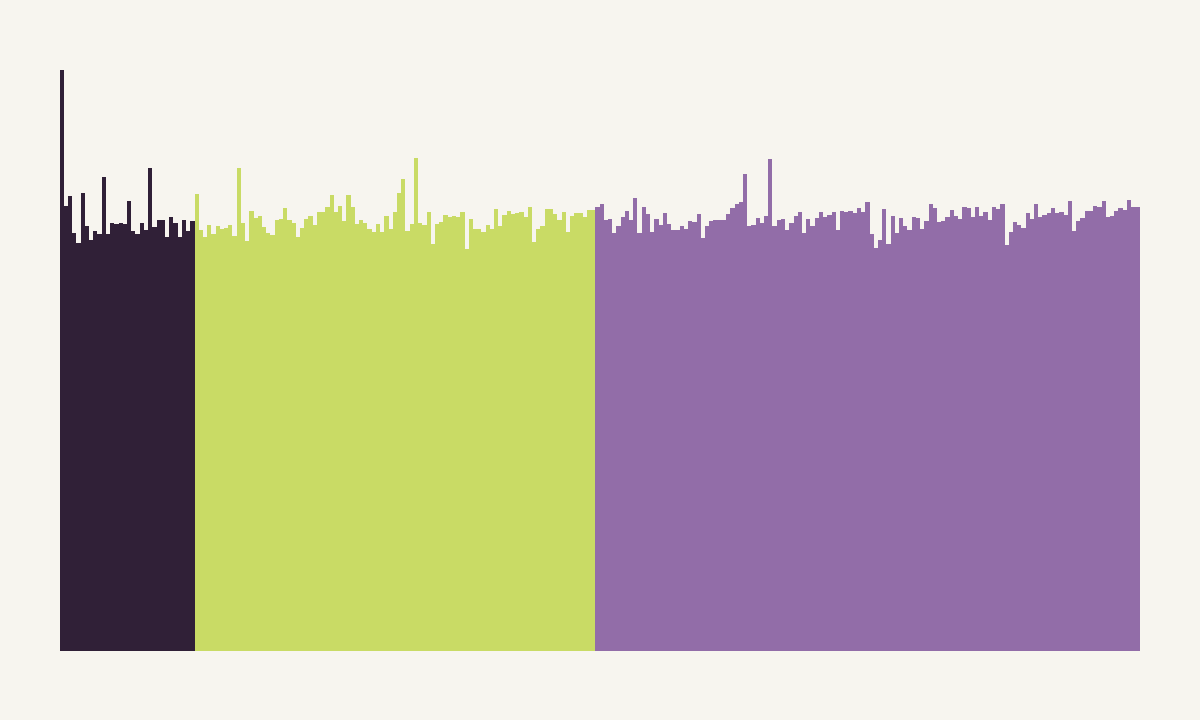
The byte histogram of the PNG file is nearly flat, and that is expected for deflate output: compressed bytes of any kind spread across all 256 values. This is why a histogram or entropy plot cannot separate pixel data from payload inside an IDAT stream. Both are compressed together. The same plot computed on the inflated bytes behaves differently. The pixel region of a photograph-like image has structure, with filter bytes at regular 3,601-byte intervals, while an appended text-like or compressed-container tail changes the distribution abruptly at the 3,053,648-byte boundary. A byte map of the inflated data shows that boundary as a clear change in texture. The binary data visualization guide explains how such maps are read, and the compression versus encryption page covers why compressed regions look uniform.
Tool choices
pngcheck validates structure and chunk order. binwalk scans for embedded signatures and trailing data, and it can also try to inflate zlib streams it finds. zsteg handles pixel-bit payloads. identify surfaced the warning that started the investigation. For a file like this one, none of them extracts the answer by itself, and a dozen lines of Python do.
What transfers to other challenges
The reusable idea is to compute what a format says the content should occupy, then compare it with what is actually present. The same check applies to a JPEG with data between the end-of-image marker and the file end, a ZIP whose central directory points before real data, or a BMP whose pixel array is shorter than the file. In PNG specifically, the places to look are bytes after IEND, unknown ancillary chunks such as tEXt, zTXt or private lowercase-named ones, and the inflated IDAT length against width, height, bit depth and interlacing. Interlaced (Adam7) images change the expected size, so the calculation must use the right method for the header’s interlace flag.
Related Misc and forensics tasks from the same event include Deadnas, where arithmetic on structure sizes also settles the outcome, and Defective RAID. For tools that show this kind of structure on screen, see Veles.
Questions readers ask
Why do some PNG tools only warn about this file?
The PNG decoder inflates the IDAT data, reads exactly as many bytes as the header's dimensions require, and ignores the rest. Nothing is invalid, so libpng-based tools such as ImageMagick only report that extra compressed data was found. The file still renders as an ordinary picture.
How does this differ from data appended after IEND?
Bytes after the IEND chunk sit outside the PNG structure and show up with binwalk or a file-size check. Here the payload lives inside the compressed IDAT stream, so the file ends exactly where a valid PNG should, and only comparing the inflated length with the expected pixel bytes reveals it.
Can zsteg find this automatically?
zsteg looks at least significant bits and some channel orderings of the decoded pixels, and also reports extra data it detects. Because the payload sits past the last pixel row, the pixel-bit checks alone will not read it; inflating the stream manually is the dependable route.
New to capture the flag? Formats, teams and a first-month plan in one place.
Read the CTF guide